iPhone's Built-in Measure App Available Since 2018
The Measure app is a built-in tool on iPhones from iPhone 6s and first-generation iPhone SE onwards that uses the camera to gauge dimensions.
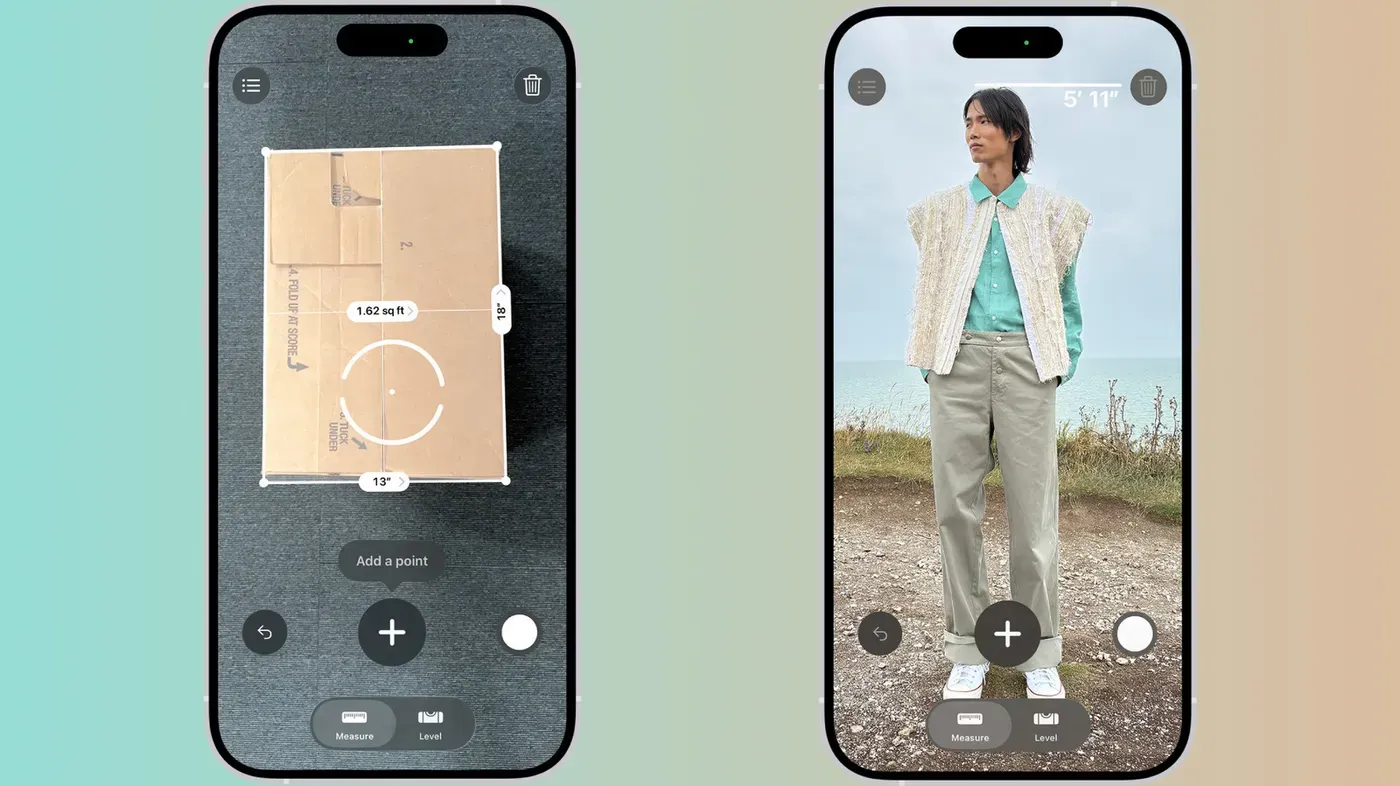
A feature that's been lurking on iPhones for years has gone largely unnoticed by many users - a built-in tool for measuring objects using the phone's camera. This Measure app is pre-installed on devices from the iPhone 6s and first-generation iPhone SE onwards.
While it may not be well-known, this feature has been available since 2018, although Apple hasn't actively promoted it. As a result, many users might be unaware of its existence or have forgotten about it. The app can still be found in the Utilities folder on compatible iPhones.
The Measure app uses the camera to gauge dimensions and can provide instant height measurements for people, guide lines that snap to edges, as well as a ruler view with tick marks when close enough.
When using the Measure app for the first time, you need to slowly move your phone around the area in which you want to measure objects. This initial scan allows the app to map your surroundings and provide accurate measurements later on.
Once the scanning process is complete, you can start measuring objects by aiming the dot at one end of the object and tapping the + button. Then, move the camera view to the other end and tap the + button again, and the length will appear on the screen instantly.
You have several options for managing your measurements within the app. If you want to save a measurement, you can tap the shutter button to capture a screenshot of it in Photos. Alternatively, if you need to go back or start over, there's an undo button available, while tapping the clear icon will remove all measurements and take you back to square one.
The Measure app also has features that automatically detect rectangular objects. If it detects the edges of a rectangle, a white box will appear around it, allowing you to tap on it or the + button to see the dimensions of the object.
In addition to measuring lengths and detecting rectangles, the app can also be used as a level tool. By tapping the Level tab at the bottom of the screen, laying your phone flat on a surface such as a shelf or picture frame will show you how many degrees you're off by. You can even compare the slopes of two surfaces by capturing the first angle and then rotating the iPhone to match it with the second surface.
Measuring objects on the go has become increasingly convenient thanks to smartphone technology.
When traveling or shopping, it's not uncommon for people to need a quick measurement of their luggage or furniture. In these situations, having a digital tape measure at one's fingertips can be a lifesaver. By simply pointing the phone camera at an object, users can get an approximate measurement, which can help them gauge whether a piece of furniture will fit in their home.
However, it's essential to note that this method is not foolproof and should only be used as a rough estimate. For critical applications or projects where accuracy is paramount, a physical tape measure is still the best option. Additionally, the effectiveness of this feature depends on the object's dimensions and distance from the phone camera.
Android users may soon find themselves without a direct equivalent to Apple's Measure app, as Google has discontinued its own measurement tool in 2021. Meanwhile, Samsung's Quick Measure app, which was preinstalled on some Galaxy phones, will be shut down at the end of 2026. Despite this, users can still download and use the app until then.
Samsung has announced that it plans to revive the Quick Measure app in the future with improved services, although no specific timeline has been provided. The company claims that the app will continue to function after its scheduled shutdown date, giving users some time to adjust to alternative measurement methods.
For Android users without a built-in LiDAR scanner like some iPhone models, third-party apps are their primary option for measuring distances. However, these apps often face limitations due to the absence of advanced hardware capabilities. As a result, reviews suggest that many available options in the Play Store are marred by ads and aggressive subscription prompts.
Investing in a small keychain tape measure may be the most practical solution for Android users who need accurate measurements. This analog approach can provide reliable results without relying on potentially flawed or intrusive third-party apps.
Facts based on reporting originally published by Engadget.
You may republish this story, in full or in part, if you credit News Central Site and link to it (licence CC BY 4.0). Photos are not included.