Windows 11 introduces customizable right-click menu in Insider Beta preview
The new feature allows users to add or remove specific commands and move certain items to different locations on their menus.
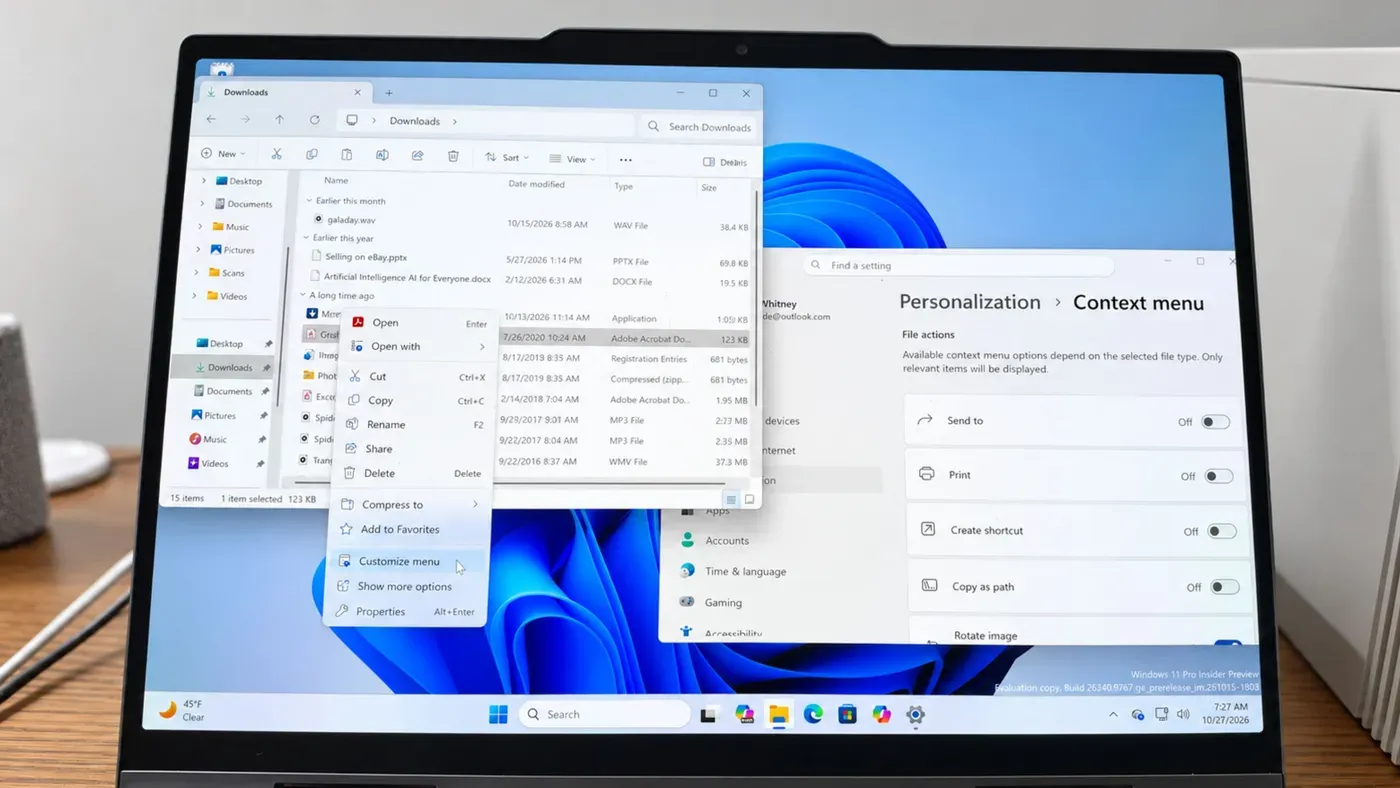
Windows 11 has long been criticized for its cluttered right-click menu, which can become overwhelming as users install more applications on their devices. This issue has plagued Windows for some time, making it difficult to quickly access the commands and settings needed.
Microsoft's attempt to revamp the menu with a smaller layout in Windows 11 was met with frustration by many users, who found that frequently used items were often missing from view. To mitigate this problem, Microsoft introduced an option to view the older-style menu with another mouse click, but this only served to highlight the limitations of the new design.
A more significant change is now underway with the introduction of a customizable right-click menu in Windows 11 Insider Beta preview. This feature gives users control over which items appear on their menus, allowing them to add or remove specific commands and move certain items to different locations.
The goal of this new feature is to simplify the right-click menu and reduce clutter by giving users more flexibility in customizing their experience. Users can now include entries for actions such as editing a text file with Notepad or opening an image in the Photos app, providing a more streamlined interface that better meets their needs.
To access this feature on your Windows 11 device, you'll first need to join Microsoft's Windows Insider Program if you haven't already done so. Once enrolled, choose the Beta channel and download the latest updates.
These Insider builds can be unstable, so it's recommended that you don't set them up on your primary PC. Instead, use a spare computer, a dual-boot setup, or a virtual machine to test out the customizable right-click menu.
To get started, open File Explorer and right-click on a folder or file. A new entry will appear in the context menu, allowing you to customize it. Alternatively, navigate to Settings, select Personalization, and then click Context menu.
When customizing the context menu, you'll find that certain file actions can be turned on or off. This includes options such as Send to, Print, Create shortcut, Copy as path, and Rotate image. The available actions will vary depending on the type of file selected.
In addition to controlling which file actions appear, you can also choose which apps display in the main menu or in a submenu. This list will include built-in apps like Copilot, Clipchamp, Notepad, OneDrive, Paint, and Photos, as well as any third-party apps installed on your device.
The customizable right-click menu in Windows 11 offers a range of options to tailor the experience to individual preferences. Users can choose where to display standard file commands such as Cut, Copy, Paste, Rename, and Delete, either at the top or within the menu.
Another option is to group cloud-storage actions together in their own section, while the Customize menu command can be shown directly within the menu. The Properties command can also be moved to the bottom of the menu for easier access.
Microsoft's design goals for the updated context menu are clear: faster, cleaner, and more customizable to suit individual work styles. According to an article on the latest preview build, the new design reduces clutter at the top level, keeps frequently used actions easily accessible, and introduces a settings experience that offers more control over what appears in the menu.
The company's aim is to make right-clicking feel more responsive, predictable, and personalized. However, some users may still find themselves facing a dual-personality approach with both the new and old-style menus coexisting.
For now, Microsoft seems committed to refining this experience based on feedback from Insiders. The hope is that one day, the cluttered old menu will be phased out entirely in favor of the sleeker, more customizable alternative.
The customizable right-click menu is inching closer to its official debut in Windows 11, currently available in the Beta channel for testing. The feature's release timeline will depend on feedback from Windows Insiders, whose input will help shape the final product.
To share thoughts about the new menu, users can open the Feedback Hub and select the My Feedback option. A positive overall response could expedite its rollout to all Windows 11 users before the end of the year.
Facts based on reporting originally published by ZDNet.
You may republish this story, in full or in part, if you credit News Central Site and link to it (licence CC BY 4.0). Photos are not included.