Package Delivery Lockbox Aims to Secure Parcels at Home
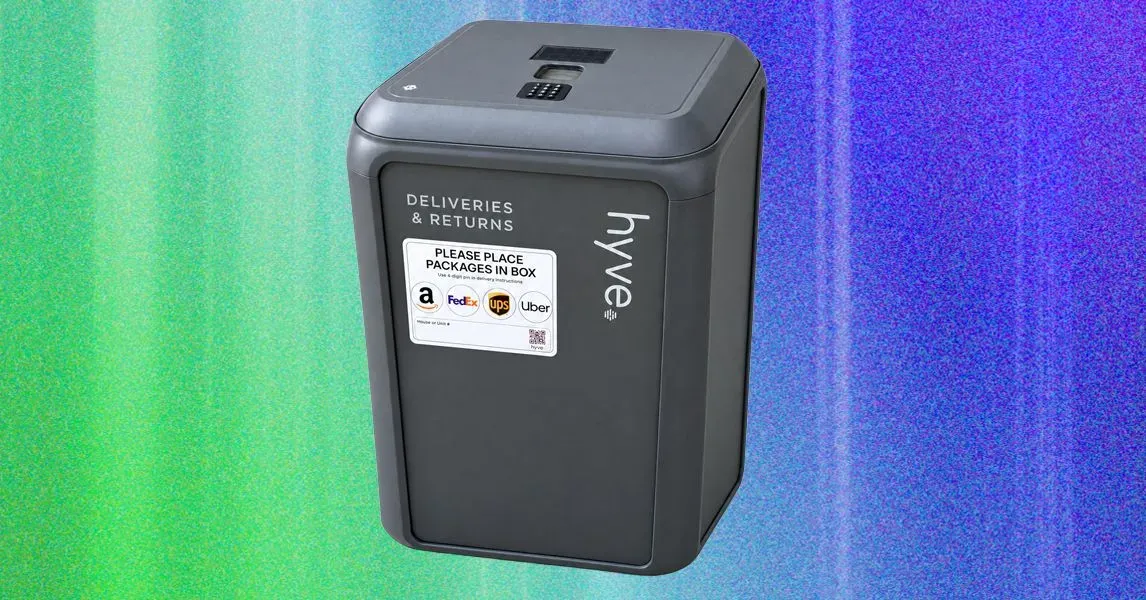
A new smart lockbox, developed by startup Hyve, allows delivery drivers to drop off packages in a secure location while notifying homeowners of its arrival.
A common problem many people face is ensuring their packages are secure when they're not at home to receive them. With an increasing number of deliveries being made every day, it's easy for parcels to be left unattended on doorsteps, making them vulnerable to theft.
The issue is particularly pressing for those who work from home or have busy schedules and can't always be present to collect their packages. Even when neighbors are willing to keep an eye out, they're not always available to do so, leaving packages exposed to potential thieves.
Package hold requests at shipping centers can be a costly solution, with fees ranging from $5 per package to much higher amounts depending on the length of time the package is held. This can become a significant expense for those who frequently receive multiple deliveries while away from home.
When packages are left unattended, they're not only vulnerable to theft but also to damage or loss in extreme weather conditions. This can be especially problematic for valuable items that require special care during transportation.
To address these concerns, a startup called Hyve has developed a smart lockbox designed specifically for secure package delivery. The device allows delivery drivers to drop off packages in a safe location while notifying the homeowner of its arrival.
The lockbox is equipped with a mobile app that sends notifications whenever someone accesses the device or when a new package is delivered. This ensures homeowners can keep track of their packages and retrieve them at their convenience.
While testing the Hyve smart lockbox, I encountered some significant growing pains, including issues with assembly and battery life. The device's battery failed prematurely on one occasion, which was unexpected but not entirely debilitating.
Despite these initial teething problems, the Hyve smart lockbox proved to be a useful solution for managing package deliveries while away from home. Its ability to secure packages in a safe location and notify homeowners of its use made it an attractive option for those who frequently receive multiple deliveries.
The design of the Hyve Smart Package Locker deviates from traditional parcel lockboxes by eliminating the two-chamber setup in favor of an electronic hatch.
This hatch is accessed through a secure 4-digit PIN entry system, allowing homeowners to retrieve their packages with ease and convenience. The overall dimensions of the locker are substantial, measuring 32 inches high, 20 inches wide, and 20 inches deep.
The interior space within the locker measures approximately 4 inches less in each direction compared to its exterior dimensions, resulting in a total volume of 7.4 cubic feet. According to Hyve, this capacity should accommodate around 80 percent of Amazon package sizes.
In my testing, I found that smaller packages such as three-pack bottles of wine fit comfortably within the locker, but larger items often left by couriers due to size constraints.
The locker's construction combines plastic and steel for a robust build, with sufficient reinforcement behind its side panels to deter potential tampering without specialized tools.
Units are available in two color options: gray or white. Unfortunately, my requested white unit was not delivered, instead receiving the gray model that I had not chosen.
Assembly of the locker is required upon arrival, and it proved to be a challenging process due to the lack of clear printed instructions. The provided QR code links to a web page featuring a walkthrough video and PDF guide, which can be difficult to navigate on smaller screens.
The absence of detailed, printed assembly instructions hindered my ability to complete the task efficiently, with some missteps requiring additional time to rectify.
The security bracket and cable tether provided with the Hyve Smart Package Locker allow it to be securely attached to a fixed object on your property, preventing thieves from making off with the entire device. This is particularly important since the unit weighs 40 pounds when unloaded, making it relatively easy to lift and move if not properly secured.
The installation of these security components is covered in a video tutorial, but surprisingly, there are no written instructions provided for this crucial step. This oversight could lead to confusion and difficulties for users who prefer or require written guidance.
To power the Hyve, four AA batteries are required, which can be supplemented by a solar panel on top that trickle charges a backup battery. The device also features a USB-C port for emergency power supply in case of a battery failure. According to the manufacturer, a set of fresh AAs should last around five or six months.
However, my experience with the Hyve's batteries has been less than optimal. After only three weeks, my initial set of four AA batteries died unexpectedly without warning. Fortunately, I was able to use the USB-C port to supply emergency power and keep the device operational.
The unit also requires its own Wi-Fi bridge, which must be connected to an internal outlet near where the locker will be placed. In my testing, I encountered difficulties finding a suitable location for the bridge due to the limited range of the wireless signal.
Exterior walls can significantly impede wireless signals, and in my case, I was unable to find a power outlet within 15 feet of the desired location that could provide a strong enough connection. After some searching, I found an alternative outlet in a guest room that allowed me to establish a stable connection.
Hyve's app is designed with simplicity in mind, allowing users to set a master PIN for access to the locker. However, this approach raises security concerns since anyone with the four-digit code can gain entry and potentially rummage through packages left inside.
The physical design of the device does not prevent one courier from removing a package that another has left inside the Hyve, but it's worth noting that this is also true for unattended packages on doorsteps. The main concern for most homeowners is likely random passers-by attempting to access the locker, making the PIN mode an adequate solution for many users.
The reliability of the device's power supply remains a concern given my experience with the batteries, and it would be reassuring to see improvements in this area to ensure consistent operation over extended periods.
The security features of the Hyve Smart Package Locker can be enhanced further with a subscription plan. The Essentials plan is available for $5 per month or $50 per year and allows users to set separate PINs for each delivery service or carrier.
This feature provides an additional layer of security as it notifies users whenever the lid of the lockbox is opened, and also informs them who accessed it. This information is logged in the system for record-keeping purposes.
To utilize this feature, users need to enter their PIN and add the lockbox details into each carrier's delivery instructions page on their website. However, some carriers provide more detailed and helpful instructions than others.
For instance, FedEx and UPS offer fields for entering gate codes but do not allow specifying that packages should be left in a lockbox. This is because these carriers have recently changed their systems to simplified drop-down menus that do not include "lockbox" as an option for delivery locations.
Users need to create separate accounts with each carrier tied to their address to use this feature. The instructions provided by Hyve on how to enter the PIN and add lockbox details are detailed but may vary in usefulness depending on the carrier's system.
The Essentials plan is included with the purchase of the Hyve Smart Package Locker for a month, allowing users to try out its features before deciding whether to subscribe further.
Hyve also offers an even higher-level subscription tier called the Hyve Returns Plan. This plan costs $15 per month and allows users to have items picked up from their lockbox at no additional charge by Hyve's own fleet of couriers.
The catch with this plan is that it is currently only available in Los Angeles and Seattle, and Hyve plans to monitor usage across the country before deciding when and how to roll out the service to other regions.
For users who do not have the Hyve Returns subscription but want to use on-demand returns, they can still schedule a pickup through Uber Courier with no additional charges due to Hyve. However, this option comes with its own set of fees depending on the distance to the nearest UPS, FedEx, or Amazon drop-off location.
The fees for using Uber Courier vary and can range from $8 to $18 for dropping off an Amazon return, making the $15 twice-monthly return plan a more cost-effective option in the long run.
The initial setup of the Hyve Smart Package Locker was relatively straightforward, but it soon became apparent that the device's main advantage - securing packages from porch pirates - wasn't entirely foolproof. A test using Uber Courier to create a return package showed that while the lockbox added an extra layer of security by requiring a PIN, the risk of exposure was still present.
The physical design of the Hyve locker itself is functional, if not exactly aesthetically pleasing on a front porch. The weather-resistant material and secure locking mechanism are welcome features, but the overall appearance may not be to every homeowner's taste. A satisfying click accompanies each opening and closing of the door, while an alarm sounds if it's left open for too long.
However, there is a significant issue with using the Hyve locker: many delivery drivers seem reluctant to use it, despite clear instructions on how to access packages inside. In one instance, a FedEx driver arrived with a package but simply left it next to the Hyve locker instead of putting it inside as instructed.
Despite this setback, the setup process is generally smooth, and notifications from the Hyve mobile app are timely and accurate. Users receive updates when a delivery is made, including information on which carrier was used and whether the hatch has been opened.
When encountering the FedEx driver in person, it became clear that part of the problem lay with the company's own systems. The driver device provided verbal instructions on where to leave packages, but the volume had been turned down, leading to confusion about what to do next.
A demonstration of the Hyve locker by a homeowner can help alleviate these issues and win over delivery drivers. In one instance, this approach was successful in getting a FedEx driver to use the lockbox as intended.
The problem is not with the design or functionality of the Hyve locker itself but rather with how it integrates with existing delivery systems and procedures. Until more drivers are trained on its proper use, some homeowners may continue to experience difficulties with securing their packages.
In one case, a homeowner was able to get a FedEx driver to understand and use the Hyve locker after showing him personally how it worked. This highlights the importance of clear communication in resolving issues related to package delivery and security.
The next morning, I received a notification from the Hyve app confirming that FedEx had successfully delivered a package to the locker. The driver even rang the doorbell again to confirm delivery, flashing a smile in the process.
On the third day of deliveries, another FedEx package arrived on my porch, with the driver having moved to a new route. Despite initial concerns about the system's reliability, Hyve's smart package locker had proven itself to be efficient and convenient.
Facts based on reporting originally published by Wired.
You may republish this story, in full or in part, if you credit News Central Site and link to it (licence CC BY 4.0). Photos are not included.