Google Maps functionality varies between Android Auto and Apple CarPlay systems
The experiment revealed that while the fundamentals of Google Maps are similar on both platforms, significant differences emerge when performing complex tasks beyond basic navigation.
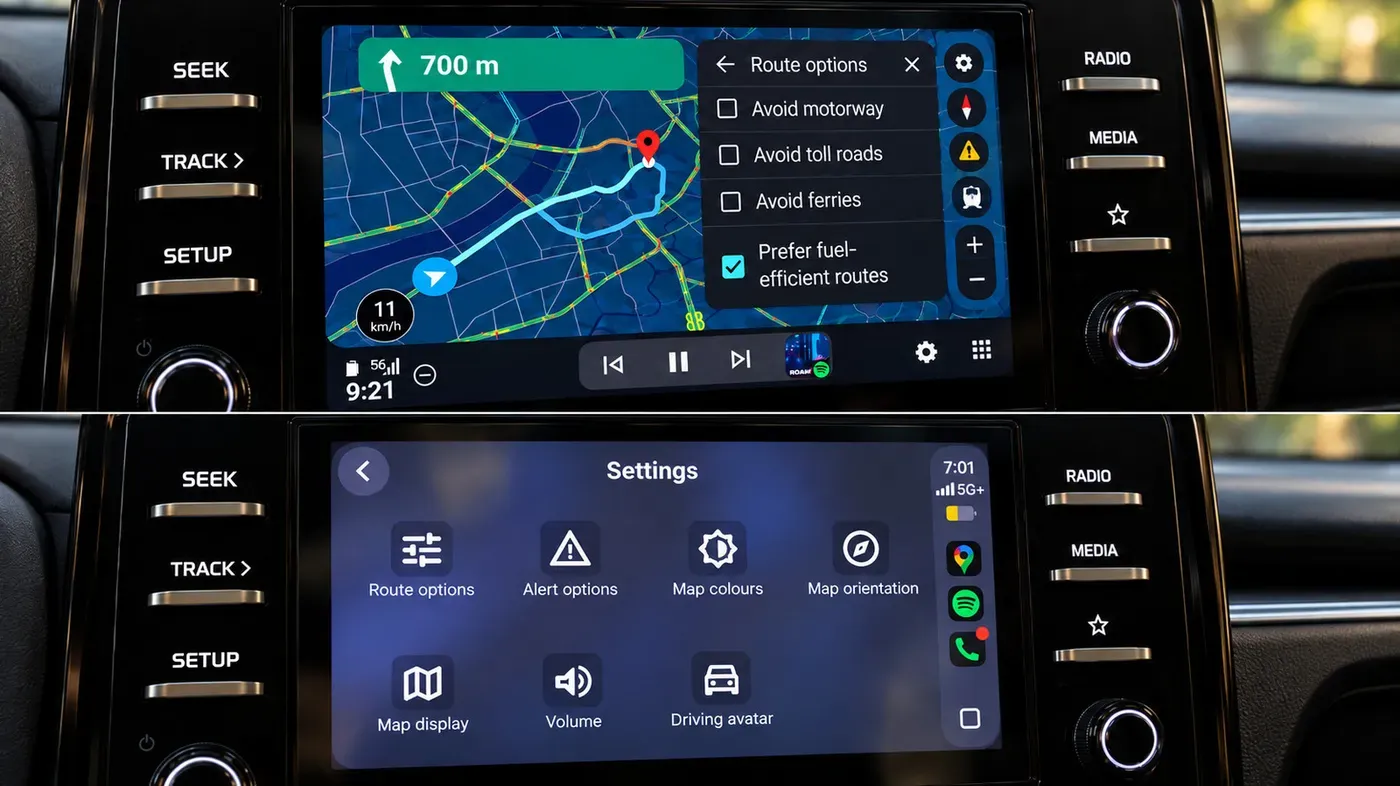
Google Maps has been a staple on both Android Auto and Apple CarPlay systems, but a closer examination reveals some significant differences in functionality between the two platforms.
To assess these differences, I conducted an experiment where I used Google Maps on both systems within the same car, performing identical searches, route changes, and simple navigation tasks back to back. While the fundamentals of the app are similar, with features like speedometer, lane guidance, incident reporting, and alternative-route suggestions available on both platforms.
However, as I continued to use Google Maps for more complex tasks beyond basic navigation, the differences between the two systems became increasingly apparent. This is where Android Auto demonstrated a clear edge over CarPlay in terms of interface details and feature functionality.
One area where Android Auto stands out is in its ability to access certain features, such as Gemini, which still provides an advantage to users on this platform compared to Apple's offering.
One area where Android Auto excels over Apple's CarPlay is in the ease of access to features like Gemini. On Android Auto, users can effortlessly initiate conversations without needing to physically interact with the screen. This hands-free functionality is a significant advantage, especially when the display is positioned centrally on the dashboard.
In contrast, while Google Maps on CarPlay eventually gained a Gemini button, users still had to tap it before initiating conversational searches and follow-ups. Moreover, invoking Gemini hands-free was not possible at this point in time. Even Google's own support page reflected this limitation, stating that Gemini was unavailable for CarPlay during the testing period.
Route modifications also proved faster on Android Auto compared to CarPlay. When searching for a fuel stop along a route and then requesting a pharmacy without reopening the conversation, the options were displayed promptly. This seamless interaction is due in part to Gemini's ability to search along routes, refine results, add stops, and show alternative routes.
Despite its strengths, Gemini on Android Auto was not infallible during testing. There were instances where it froze on a loading screen or failed to establish a connection. Nevertheless, the convenience of initiating interactions without touching the display remained a substantial benefit for drivers with their dashboard displays in the center.
When navigating a route on Android Auto, Google Maps provides a list of nearby places with ratings and estimated additional travel time for each option. This allows drivers to make informed decisions about where to stop, eliminating the need for guesswork when choosing between two options that differ by just one minute.
In contrast, CarPlay displays results one at a time, requiring users to scroll through the list using Previous and Next controls. While it still offers valuable information such as gas prices and detour times, comparing multiple options is more laborious on this platform.
Interacting with the map on Android Auto proved to be a more straightforward experience in my test, with zoom controls remaining easily accessible. Pinch-to-zoom functionality also worked seamlessly, allowing drivers to quickly adjust their view of the route as needed.
CarPlay's map-control mode, which is entered separately from navigation, did not work as smoothly for me, and pinch-to-zoom was unsuccessful during testing. However, it's worth noting that both platforms are technically capable of supporting various interactions, including taps, scrolls, and pinches, suggesting underlying differences in implementation may be at play.
When navigating unfamiliar areas, being able to glance ahead at upcoming interchanges can be crucial. However, this simple difference in functionality starts to become significant when put into practice.
Google Maps on Android Auto offers a more comprehensive interface even before entering a destination. The platform instantly displays essential information such as a Home shortcut with live estimated time of arrival and distance. This is not all - the Recent section also provides suggestions based on recent Maps searches, adding an extra layer of convenience to the user experience.
The initial Maps screen on CarPlay, in contrast, is much more minimalistic and requires a search to access similar information. This difference may seem minor at first glance but becomes noticeable when trying to access frequently used features or destinations.
While both platforms offer fuel-efficient routing options, Android Auto does a better job of explaining the recommendation. It clearly marks one of the choices as the most fuel-efficient and provides an estimated fuel savings amount, making it easier for users to make informed decisions.
CarPlay has its own usability advantage when it comes to color-scheme controls. The feature is easily accessible from the car screen's interface, allowing drivers to switch between Automatic, Day, and Night modes with minimal effort.
Google Maps on Android Auto can now estimate how much battery power is needed for a trip based on various factors including the vehicle's characteristics and weather conditions. This feature allows drivers to input their current battery level, prompting Google Maps to suggest charging stops along the route.
The estimated battery level at arrival and the time spent charging are also taken into account when calculating the expected time of arrival (ETA). This comprehensive approach is a significant improvement over simply locating nearby charging stations, as it integrates charging stops directly into the route planning process.
This new feature covers over 350 electric vehicle models from more than 15 brands in the US, but it remains unclear whether a similar rollout will occur for Apple CarPlay.
Facts based on reporting originally published by Engadget.
You may republish this story, in full or in part, if you credit News Central Site and link to it (licence CC BY 4.0). Photos are not included.