Apple Unveils Smart Display HomeView with Customizable Interface
The new smart display is part of Apple's broader effort to revitalize its struggling home ecosystem.
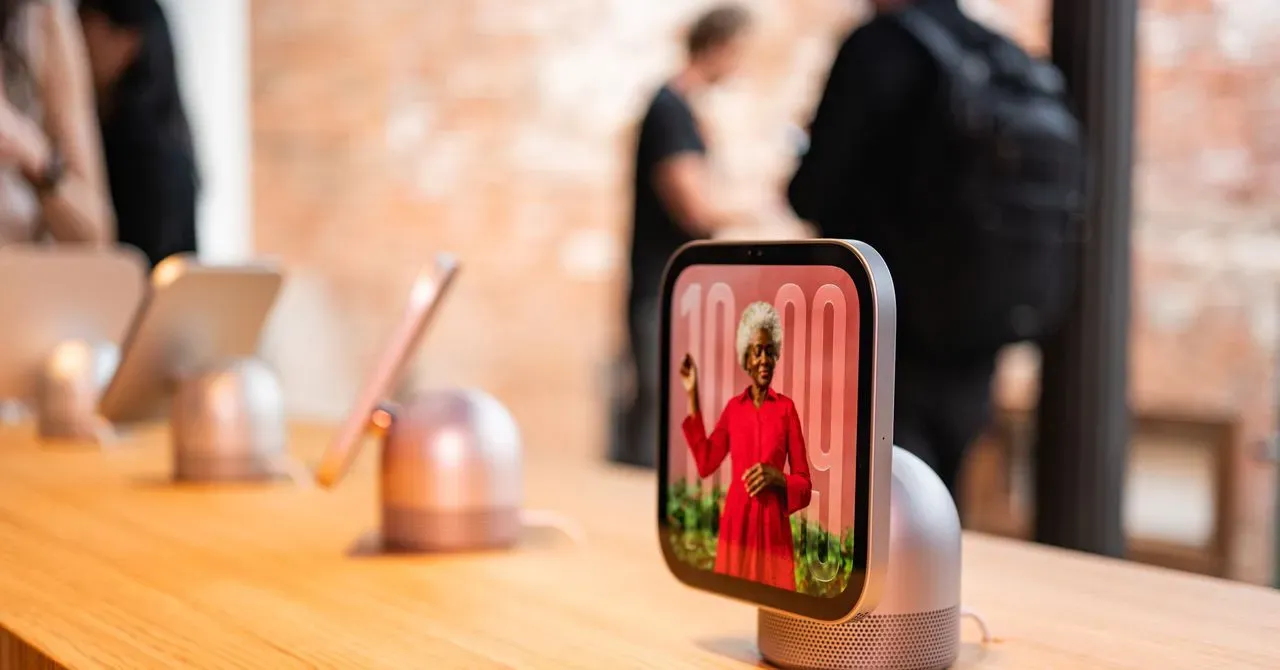
Apple has finally unveiled its long-awaited smart display, dubbed HomeView, as part of a broader effort to revitalize its struggling home ecosystem. This move comes after years of lagging behind competitors like Google and Amazon in the market for screen-enabled smart speakers.
The company's decision to stick with a smaller smart home setup centered on its HomePod speakers has been seen as a contributing factor to its lackluster performance in this space. The removal of the iPad as a hub device several years ago forced users to opt for either an Apple TV or HomePod to get started, limiting the scope and accessibility of the ecosystem.
The new 7-inch smart display is being released alongside other devices aimed at boosting Apple's home offerings. With its sleek design and customizable interface, the HomeView seems poised to make a significant impact in the market. The device comes in two versions: a speaker base and a wall-mounted display, both priced at $299.
Preorders for the HomeView are now live, with sales set to begin on November 13. This marks an important milestone in Apple's bid to regain ground lost to its competitors in the smart home space. As the company continues to expand its offerings, it remains to be seen whether the HomeView will finally bring much-needed success to its lagging ecosystem.
The design of the HomeView bears a striking resemblance to the Apple Watch, with multiple "faces" that can be easily swiped through. These customizable interfaces allow users to access various types of information, from clock faces and favorite photos to weather updates and even animated Snoopy characters.
The home screen of Apple's HomeView is remarkably similar to an iPhone or iPad interface, featuring neatly arranged apps alongside widgets. However, this similarity ends when it comes to the underlying software, HomeView runs on its own proprietary operating system, distinct from iOS and iPadOS.
Unlike traditional mobile devices, HomeView does not have access to the App Store, instead relying on a curated selection of pre-approved applications. This includes basic tools like FaceTime, Messages, and Safari, as well as a limited number of third-party media apps such as Spotify. Developers can also bring over existing CarPlay apps for compatibility.
One notable advantage of HomeView is its ability to seamlessly integrate with an iPhone that has Apple Intelligence support, specifically, the iPhone 15 Pro or newer models. This integration enables more advanced features, including smarter app actions and personal context queries. However, users with older iPhones can still set up HomeView, although they will be limited to accessing some basic Siri AI capabilities.
The physical design of HomeView is sleek and minimalist, with an aluminum body available in four colors: silver, starlight, rose pink, and space gray. The standard model features a speaker base with a screen that tilts manually for angled viewing, while a wall-mountable version can be purchased separately.
A key consideration when choosing between different HomeView models is the need for an iPhone to match the capabilities of the display. As Apple explains, users can still access some basic Siri AI functions even with an older iPhone, but more advanced features require a newer model with Apple Intelligence support.
The Apple HomeView device offers multiple mounting options for users, catering to both DIY enthusiasts and professional installers. One of these mounts is designed to be installed by anyone, featuring a visible power cord that must be connected to an electrical outlet.
In contrast, the other two mounting options are specifically tailored for professional installation, with one being hardwired and the other utilizing Power over Ethernet (PoE) for connectivity. This flexibility in mounting options allows users to choose the most suitable solution based on their specific needs and preferences.
The HomeView's audio system is integrated directly into the screen, comprising two full-range drivers that provide a range of sound frequencies. However, the standard model also features an additional base unit with a down-firing woofer and two passive radiators for enhanced bass response, capable of filling large rooms with clear sound.
A 7-inch Liquid Retina display powers the HomeView, incorporating Apple's True Tone technology to adjust color temperature in accordance with ambient lighting conditions. This feature is particularly useful when using the device on a nightstand or in other settings where brightness levels may need to be adjusted.
Apple's HomeView device has introduced a feature that allows multiple users to set up their own personalized home screens, adapting to each person's preferences and settings.
This feature is made possible by allowing users to add up to six iCloud accounts, which enables the user interface to adjust accordingly. For example, one household member can have a distinct setup with green-tinted app icons and no widgets on their home screen.
However, this personalized content will only be visible when the corresponding iPhone is on the same Wi-Fi network and has been recently unlocked, ensuring that sensitive information remains secure.
The device also supports Apple's Handoff technology, allowing users to seamlessly transfer content between their iPhone and HomeView, such as sending a recipe from Safari or continuing a podcast.
The HomeView's seamless transfer feature allows users to easily switch between their iPhone and the device during a FaceTime or phone call. This is achieved by simply placing the iPhone near the HomeView, which will automatically take over the call.
Siri AI is at the core of the HomeView's functionality, enabling users to interact with the device through voice commands. While a keyboard can be pulled up for typing, Siri remains the primary means of communication with the device.
Apple has significantly improved Siri this year, launching a more advanced assistant in iOS 27. This revamped version is capable of understanding personal context from the user's iPhone, allowing it to provide more accurate and relevant information.
When asking Siri about upcoming events or tasks, such as a friend's recommendation for a song or a family member's estimated arrival time at home, the device can access relevant information from Messages history and calendar entries. This enables users to create schedules and reminders with ease.
The HomeView also features a convenient feature that converts recipe pages from Safari into easily digestible content. Users can load a recipe and view ingredients or start cooking without having to read lengthy paragraphs of related text, making it easier to follow along.
The Apple HomeView's intuitive interface allows users to easily navigate through recipes and cooking instructions. It automatically breaks down complex recipes into manageable steps, even providing pre-set timers for each task. This feature enables cooks to focus on preparing individual components without getting overwhelmed by lengthy instructions.
In addition to its culinary capabilities, the HomeView also serves as a central hub for controlling smart home devices. Users can create widgets for their connected gadgets, making it simple to adjust settings and monitor activity from a single screen. This integration is designed to simplify home management and enhance overall convenience.
The device's camera face offers another useful feature, providing real-time feeds from connected security cameras. By swiping left on the home screen, users can access up to nine live streams simultaneously, keeping them informed about their surroundings. This capability caters to homeowners who value security and peace of mind.
Ultimately, Apple's success with the HomeView relies on its ability to deliver a seamless user experience through Siri. While the voice assistant has room for improvement, Apple is banking on its integration with iPhones and Watch-like software to make the device feel essential in the home environment.
Facts based on reporting originally published by Wired.
You may republish this story, in full or in part, if you credit News Central Site and link to it (licence CC BY 4.0). Photos are not included.