Steam Overlay Offers Enhanced Features for Gamers
A significant update to Steam in 2023 introduced a revamped overlay that has set a new standard for game overlays and launchers across the industry.
Steam users may think they're familiar with the platform's overlay feature, but a closer look reveals a wealth of capabilities beyond what meets the eye.
A significant update to Steam in 2023 introduced a revamped overlay that has set a new standard for game overlays and launchers across the industry. This redesigned interface offers an impressive array of features that enhance the gaming experience. For gamers who frequently use the overlay or are looking to explore its full potential, it's surprising how much functionality is available.
To access Steam's overlay while playing games, press Shift + Tab on your keyboard simultaneously. If you're new to the platform, this shortcut will open up a world of possibilities. Alternatively, you can customize the key combination from within Steam's settings menu by clicking on the 'Settings' option and navigating to the 'In-Game' section.
Steam users can adjust various overlay settings, including the ability to disable it altogether if needed. The platform is also smart enough to remember individual game configurations, so gamers don't have to reorganize the interface for each new title they play.
The variety of features available through Steam's overlay has set a high bar for other platforms and publishers, who are now scrambling to catch up with the industry leader. As gamers continue to explore the capabilities of Steam's redesigned overlay, it will be interesting to see how its functionality evolves in response to user feedback and emerging trends in gaming technology.
The Steam overlay has become a vital part of gaming on the platform, offering a wide range of features that can enhance your overall experience.
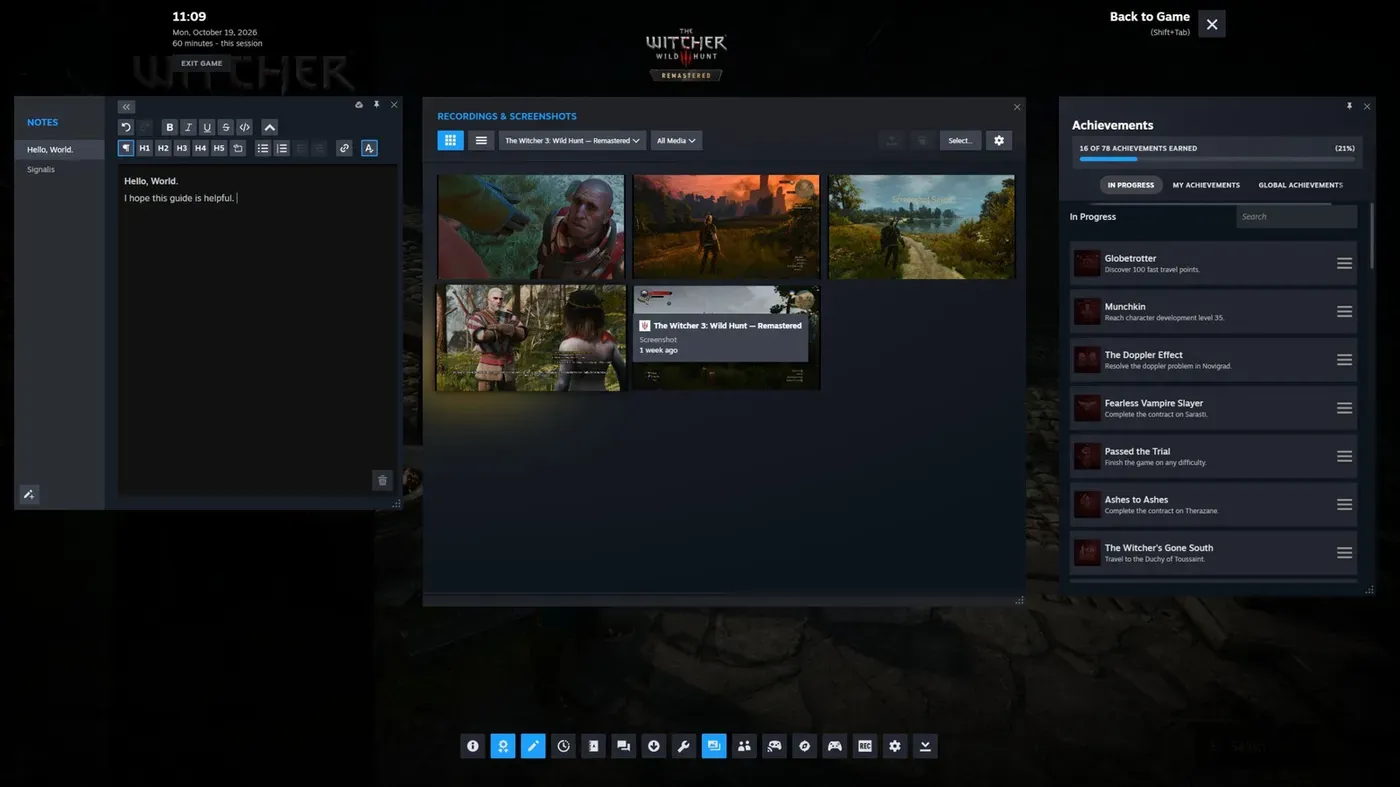
One of the most useful features is the built-in browser, which allows you to access web pages without leaving your game. This is particularly handy for checking out online guides or tutorials that might help you overcome obstacles in your current playthrough. You can easily switch between your game and the browser by pressing a shortcut at the bottom of the overlay.
The Steam overlay also offers a text editor, which can be useful when playing puzzle games like Blue Prince or Tunic. This feature allows you to jot down notes as you try to piece together clues, making it easier to keep track of your progress. The editor is fairly robust, allowing you to format text and even write code blocks.
The overlay's features are not just limited to in-game tools. It also includes a timer function that can help you keep track of time while gaming. This is particularly useful for those who have limited gaming sessions due to other commitments. With the built-in timer, you can set reminders to switch between games or activities.
Gamers with favorite community guides will appreciate being able to access them directly from the overlay. These guides are often excellent resources that offer valuable tips and strategies for completing levels or achieving specific goals in a game.
The Steam overlay offers a range of features that go beyond just providing information about the game you're playing. For instance, you can view and manage screenshots and recordings directly from within the overlay.
From here, you can browse through all your captured images and videos, even those taken in other games. When you click on one, you'll have the option to save it to a folder on your computer or share it with friends over Steam chat.
Sharing your gaming experiences has never been easier. With just a few clicks, you can send your screenshots and recordings directly to social media platforms or even transfer them to your smartphone via the Steam Mobile app.
The overlay's sharing capabilities extend to other features as well. You can also use it to manage your saved games, view game guides, and access other in-game resources.
The Steam overlay offers more than just game management features, as it also enables seamless co-operative gameplay with friends through Valve's Remote Play Together protocol. This allows up to four players to join in on local co-op games over the internet, without requiring friends to own a copy of the game themselves, provided it supports the protocol.
To start a co-op session, simply navigate to the Steam overlay and click the Remote Play button. From there, you can invite your friends to join in, giving them access to control the game alongside you - even if they don't have their own controller. The best part is that they won't be able to access any other parts of your PC while Remote Play is active.
With these features at your fingertips, starting a co-op session has never been easier or more convenient.
Facts based on reporting originally published by Engadget.
You may republish this story, in full or in part, if you credit News Central Site and link to it (licence CC BY 4.0). Photos are not included.